My TV Is a Painting, and Also the Family Dashboard
We have a Samsung The Frame in the living room. In art mode it shows a rotating gallery of public-domain paintings, and most guests never realize it is a television. It is a nice object. It is also, for most of the day, a 55-inch display doing nothing but looking pretty.
So I asked Claude Code — running in a session on the always-on Mac Studio at home — to turn it into a family dashboard without losing the painting.
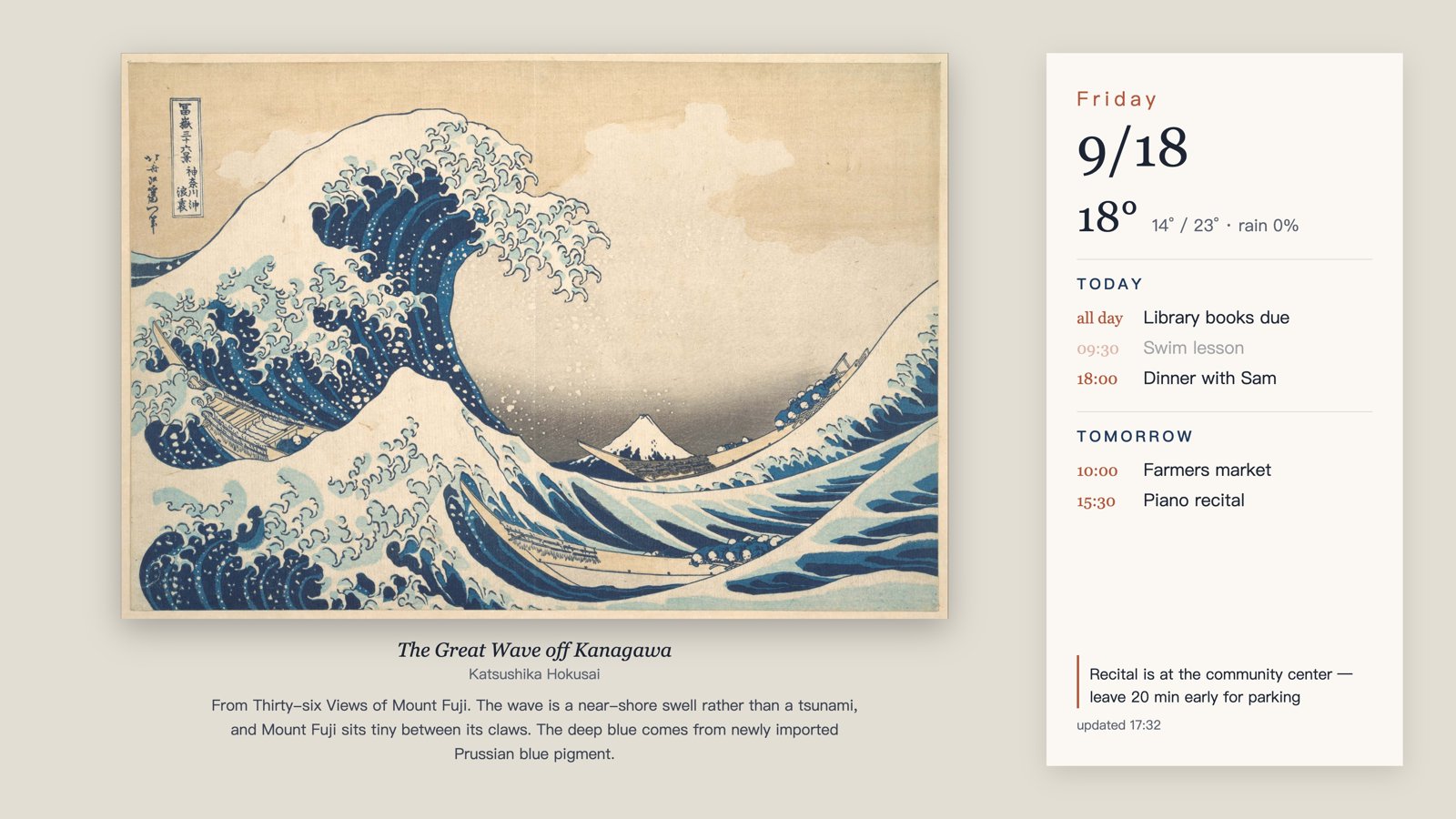
The left is the artwork, uncropped, with a short note about it. The right is today and tomorrow: weather, the family calendar, and a reminder or two. Events that have already happened fade out. It refreshes every 15 minutes between 7:30am and 9pm, and the whole thing lives inside art mode, so the TV keeps its art-mode brightness, color temperature, and motion sensor behavior.
The Workflow
Nothing runs on the TV. The TV only knows how to display art, so the trick is to make the dashboard be art:
catalog.csv + artwork files ─┐
board.json (calendar, notes) ─┼─► template.html ─► headless Chrome ─► 4K JPEG ─► The Frame
Open-Meteo (weather) ────────┘
A Python script picks the hour's artwork, fills an HTML template, screenshots it with headless Chrome at 3840×2160, then uploads the JPEG to the TV over the local network using samsung-tv-ws-api, selects it, and deletes the image it uploaded last time. That last step matters: without it the TV quietly accumulates one copy of the dashboard per refresh.
Two rules shaped the design more than anything else.
Never interrupt someone watching TV. Before pushing, the script asks the TV whether it is in art mode. If someone is watching a movie, the update is skipped entirely — no forcing the TV back to art mode, no "helpful" interruption. An automation that fights you for the screen gets unplugged within a week.
Never touch the existing gallery. The TV already holds 90-odd paintings I uploaded over time. The script records the content ID of the image it pushed, and only ever deletes that one. Everything else is off limits.
Who Writes the Calendar
The renderer reads a plain board.json:
{
  "events": [
    {"date": "2026-09-19", "time": "09:30", "title": "Opening ceremony"},
    {"date": "2026-09-19", "time": "10:30", "title": "Dance class"}
  ],
  "hide": ["lunch ordered"],
  "notes": ["Leave 20 min early — parking fills up"]
}
That is the whole contract. The renderer knows nothing about Google, OAuth, or iCal. Something else writes the file.
In my setup that something is a scheduled Claude Code task that runs three times a day. It reads the family calendar through the Google Calendar connector, writes the next three days into events, and — this is the part a cron job could not do — curates. It shortens "Mila – Dynamights (Airborne Gymnastics)" into something that fits a card. It drops the recurring all-day event that says "lunch ordered," which is useful as a reminder to my wife and useless on a wall. It reads the event description for the opening ceremony and turns "arrive early, parking is limited" into a one-line reminder pinned to the bottom of the card.
The split turned out to be the good idea in this project. A dumb 15-minute loop handles what must be reliable: re-render, update the clock, gray out what has passed, push. An LLM handles what needs judgment, three times a day, where being slow and occasionally wrong is fine. Neither is asked to do the other's job.
Choosing the Art
The first version picked one painting per day by day-of-year, walking the catalog in order. Two problems showed up immediately: a whole day of the same image looks like a frozen screen, and consecutive days came from the same category — five Dutch landscapes in a row, because that is how the catalog is sorted.
Now it is one painting per hour, drawn from a seeded shuffle of the catalog. Deterministic, so any two machines agree, but neighboring hours are unrelated: a Roman sketch, then Dong Qichang, then Bierstadt's prairie, then a Webb telescope image of the Carina Nebula. About 14 paintings across a day, and the full catalog takes roughly six days to cycle.
Each one carries a couple of sentences underneath — where it sits in art history, what to notice. Claude wrote those for all 83 works in the gallery, and tops up the file automatically when I add new art. It has quietly become my favorite part: I have learned more walking past that TV than I did from any museum audio guide, mostly because the label is there when I happen to look up.
Small Lessons
A few things that cost more time than expected, in case you build something similar:
- A fixed-size card needs a plan for overflow. My first layout put the artwork label inside the card, where a long blurb plus a packed day pushed text off the edge. The fix was structural, not typographic: move the label under the painting, where the empty wall is; clip the card; cap each day at a few rows with an "N more" line; pin reminders to the bottom. Now a worst case degrades gracefully instead of spilling.
- Sync three days, not two. With only today and tomorrow in the file, the "tomorrow" column goes empty the moment the clock passes midnight. I found out by looking at the TV and wondering why a busy Saturday appeared blank.
- Background jobs on macOS live in a different world than your terminal. The same command that works when you type it can hang or fail when launchd runs it — cloud-storage files, online-only placeholders, and local network access each need their own permission grant, and the errors don't say so. Claude worked through all three; the fix each time was a toggle in System Settings.
What It Actually Changed
Less than I expected, and more than I expected. Nobody in the house "checks the dashboard" — that was never the point. But walking through the living room now tells you it is Friday, that it is 18° outside, that the gymnastics class is at 3:30, and that the thing on the wall is a Hobbema. The information arrives without anyone opening a phone, which turns out to be the entire value proposition.
The code is on GitHub: the-frame-family-dashboard. It is under 300 lines of Python plus an HTML template, MIT licensed. It assumes a Mac, Chrome, and a Frame TV from roughly 2021–2024; it deliberately ships no calendar integration, because board.json is easier to write than any API I could have wrapped.
The broader thing I keep noticing: an always-on agent session at home is not mainly a coding assistant. It is a thing that can see the local network, hold a household's context, and do the boring 20% that turns a hobby project into something the family actually uses.